Category Archives: Thoughts and Opinions

Tidying Up After Steam

Yo, it’s almost been two weeks since EBF4’s Steam launch, and things have been kind of hectic, but they’re calming down now.

Here’s some of the stuff I’ve been up to:

Dealing with technical problems for customers.
There’s not been very many people with problems, but it only takes a few to become annoying. And there’s still a few issues that I have no idea how to solve. I’d rather give out refunds than deal with this stuff, but Steam doesn’t let me do that personally. D:

That’s another reason why I don’t want to release the game on Mac and Linux. It’s hard enough for me to help out people on Windows! Imagine trying to do tech support for operating systems you’re not familiar with… hah! I’m not going to put myself in that position. Nope. No way.

Fixing bugs.
There’s not been a lot of serious issues, but there’s still a few things that I’ve had to fix, including one broken achievement. I’ll be updating the game within a day or two with these fixes.

Giving out free copies.
I’ve given out over 500 free copies of EBF4 already. To YouTubers, Fan artists, reviewers, and people like that. But the biggest chunk went to groups that do game giveaways.

Reading reviews and watching Let’s Plays.
It’s interesting to see what people think of the new content, especially those playing on Epic difficulty. It was supposed to be incredibly hard, but perfectly managable if you use some strategy. And that seems to be more or less what people are reporting.

Looking for other distribution platforms.
Good Old Games turned me down because they felt that EBF4 wouldn’t sell well, since there’s already a free version. Fair enough. The Humble Bundle guys seem to be more interested in the game though, and it should show up on the Humble Store sometime soon.

I’ve also been contacted by a few of the lesser known bundles, and I’ll try to stick EBF4 into some of those too.

Anyway, I can’t wait until all of the above is out of the way, and I can finally work on something new.

Classic Films and Random Thoughts

It’s been ages since I’ve done a personal blog. Winter’s just been kind of dull for me, but I’ll try to write a few things.

I’ve been watching a lot of classic movies lately. Spelunky and La-Mulana reminded me that I still hadn’t seen Indiana Jones, so I decided it would be a good idea to see where culture comes from. So far I’ve seen:
• Indiana Jones 1,2 and 3
• Terminator 1 and 2
• All of the Rocky Films
• Rambo 1 and 2

My favorite of the bunch has to be the earlier Rocky films, but I also loved Terminator 2. I expected Indiana Jones to be more about exploring temples and ancient cultures, and less about cheesy action scenes with Nazis. So I was a bit disappointed there.

I’m interested to hear from you guys about what other old films I should watch. I’ve really not seen very many.

I’m still playing a lot of games on Steam. I’ll do another batch of reviews soon.

I watched Indie Game: The Movie again. It made me feel like I’ve sold out a bit, in the sense that I’ve started making games based on what the players want, rather than what I want. If it was up to me, I’d make the EBF games more like the RPGs I played when I was a kid. With no bestiary, cheap enemies, really hard to find secrets, no easy mode, and stuff like that. But instead I’ve tried to make EBF4 as accessible as possible, and as a result, I think it feels a lot less personal.

Interestingly, most of the game developers that were featured in Indie Game had made very hard games, and that didn’t seem to hurt their popularity at all. Super Meat Boy, Braid, and Fez were all very difficult, either in their action or in their cryptic puzzles.

Edmund McMillen made an interesting point in one interview about Binding of Isaac. He said he didn’t like displaying numbers in his games, or explaining the mechanics in detail, leaving the player to learn and memorize everything by themselves. I would kind of like to do a bit more of that in EBF (for example, by not explicitly mentioning the special effects of equips or skills), but I wonder how well that would go down with players.

Anyway, I don’t plan on changing the way I make games, since this approach has worked well for me so far. And I’ve not totally sold out; I still do a lot of things that many casual players don’t like. (like making unobtainable ultimate weapons, the cut-out art style, some super hard puzzles, and troll bosses like the glitch)

Oh well.

Now that the Kongregate release of EBF4 is out of the way, I’m going to be getting ready for the Steam release. It shouldn’t take too long, as I’ve already solved most of the hardest problems. All I have to do is get rid of Kongregate’s branding, change the loading screen, add support for multiple resolutions, stick in Steam’s API, make some more Steam store graphics, and package the game nicely. Hopefully that won’t take too long, but tricky problems have a way of popping up.

The developer of Intrusion 2 was awesome enough to help me out with a few things, so you should go buy his game!

And one last thing; I’ve got a girlfriend now!
She’s fun to hang out with, and we’ve got a lot in common, so that’s nice.
And I don’t have to play Outlast by myself anymore! Hurray!

Remaking Cat Cafe

Here’s a little blog about what I’ve learned while working on Cat Cafe. If you do a lot of game programming, then you’re probably familiar with a lot of this stuff. But if like me, you started off by making Flash animations, and are used to making games in the Flash Pro IDE, some of the following features may be new to you.

The advantages of hardware acceleration!

As most of you probably already now, Flash was designed for running small animations in web browsers. It’s traditionally never taken advantage of your GPU (graphic’s card), because you don’t really want to give random Flash apps that much power over your machine. Flash also likes to use vector art to save on filesize. As a result, Flash’s graphics performance is rather crap.

But new versions of Flash introduced the Stage3D API, which lets you take advantage of the GPU, hurray! Still, this feature has to be enabled on whatever website is showing the Flash content, so it won’t work everywhere. On mobile devices, you don’t generally use web apps, and instead you download them to your phone from trusted sources, and when you do that, you give them permission to do whatever they need to do. So getting permission to use the GPU isn’t an issue anymore.

So hardware acceleration means better performance, but you need more permissions, which web-apps don’t usually get.

What is Starling?

The Stage3D API is really hard to use. It’s really low level stuff. Starling is a framework that gives you a layer on top of Stage3D which is much easier to use, and works more like Flash’s normal sprites and display list.

The major difference between working with Starling and working in Flash Pro, is that you gotta do a lot more coding. You can’t just put a bunch of vector graphics down on the stage and then do some motion tweens on them. You have to save your graphics as bitmaps, and create and control them through code. This makes it a lot harder to put together a scene you’ve visualized, but it also gives you a lot more control over the objects in your game.

Advantages of scripted animation?

Well one huge advantage of scripting your tweens instead of doing them in Flash Pro means that they can be either frame-based or time-based. Frame-based tweens are synced with the framerate of your game, while time-based ones are synced to the actual time, meaning that they can have a variable amount of frames in them. This is pretty useful sometimes. In Cat Cafe, it means that the game doesn’t slow down if your phone can’t handle the full framerate of 60fps. It simply runs at the same speed, but at a lower framerate, and doesn’t play differently at all.

A lot of frequently used tweens like “bounce in” or “ease in and then out” can be created by setting one variable, which is a lot less work then setting easing over several keyframes in Flash Pro. You can even create your own preset tweens to reuse later! (I haven’t tried this, but it seems very useful. Would have been very useful in EBF, for death and heal animations, which always use the same color/alpha tweens.)

Another advantage is that it’s usually just plain easier to make changes. If you want to make an animation last longer, or you want to tween an extra property, or you want to run a function when the animation finishes, or whatever… you just have to add or change one variable. Meanwhile in Flash Pro, it can be quite frustrating trying to update many keyframes of animation if you want to change something.

One final advantage, which is quite handy, is that you can easily have tweens “blend” into each other. For example, if your character is doing an “attack” animation, and then he’s interrupted half way through and starts doing a “hurt” animation, the tweens will naturally  move into the new animation. If you animate in Flash Pro, you can’t do this, instead you get an instant animation jump, which sometimes looks quite ugly.

What is DragonBones?

DragonBones is an add-on for Flash Pro, which lets you export animations you make there into a format that is usable by Starling and maybe other frameworks too. Basically, it takes your animation, and converts all of the vector art into a bitmapped spritesheet, and converts your tweens into XML data, which can be parsed by whatever engine or framework that supports it. It actually works well, and supports frame labels and events, and everything that I needed for Cat Cafe. I haven’t tried anything very complicated yet though.

This is cool because it means you don’t have to do frame-by-frame spritesheet animation to take advantage of hardware acceleration! The performance is a bit worse due to the extra processing of the tweens and all that, but it saves memory, and it’s better than having to pre-render every frame of a long animation! Also, it lets you swap out textures/skins, which I do a lot in my games.

The main inconveniences are that I have to export the whole animation every time I want to make a minor change, and that parsing the XML data seems to take some time. But no big deal.

Dragon bones!

Dragon bones!

How has all of this effected Cat Cafe?

Well first off, it’s totally spaghettified my code. Cat Cafe was already more than half finished before I even considered using Starling or DragonBones, so I had to redo quite a large portion of the game. It would have helped to do a bit more research before jumping into a project I guess.

So I had to reprogram a lot of the game, and move a lot of code and assets to different places. The result is the messiest code that I’ve worked on since Bullet Heaven (when I was just learning AS3).

But apart from that, the performance is a lot better! Cat Cafe now easily runs at 60fps and 720p on my Galaxy Note 2. Previously it was only getting around 30fps. There’s also more animation going on now; previously the cats didn’t move once they popped up, but now they breathe and stuff. The game also runs perfectly on my dad’s HTC Sensation. I’ve also been testing it on my old HTC Desire, and it doesn’t run amazing, but it’s perfectly playable, at around 33fps.

The newer phones seem to have gained a larger performance boost from the changes. Maybe that’s because they have much better GPUs or something. Having multiple CPU cores doesn’t help much, because Flash never uses more than one (as far as I know).

I think the performance bottleneck is now at the logic, rather than the graphics rendering. For example, parsing and initializing the Dragon Bones skeletons seems to take significant processing. It’s not very noticeable on my Note 2 (takes maybe a second or less), but on my Desire, it takes around 3 seconds. Luckily, I only need to do that once when the game is loaded.

Anyway, the game runs a lot better now than I ever expected was possible with Flash, and I’m sure the performance could be even better if I was more familiar with Starling and Dragon Bones.

I should also mention that I was too lazy to remake the menus in Starling, so they’re still just normal Flash content. They don’t have much animation, and performance isn’t vital there, so I don’t really think they’re worth the effort of updating. But in future I’ll do things properly from the start and all the way through.
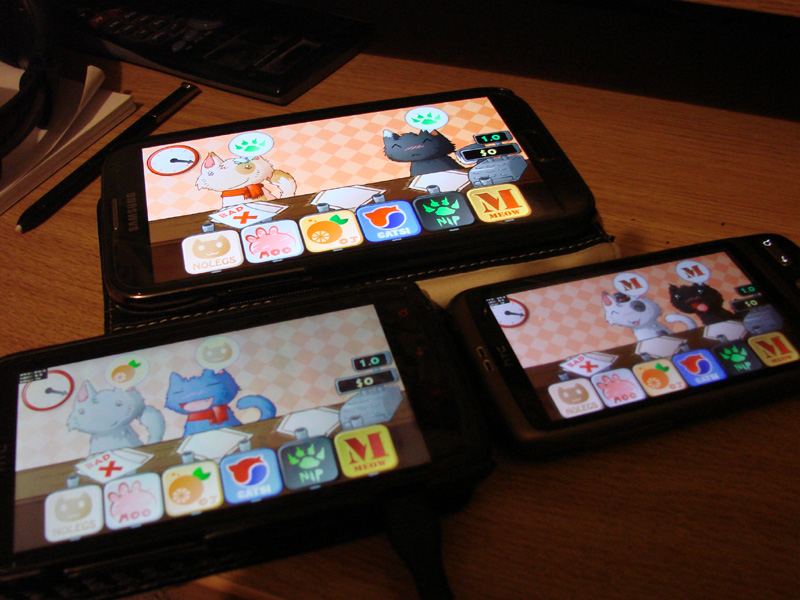
I need more phones!

I need more phones!

What’s next?

Well Cat Cafe is almost finished now. I just need add achievements, polish off a few things, maybe try to improve the performance a bit more, test on some more devices, and then publish it for beta testing.

I’ll release the phone version on the web for some testing and feedback first. This will literally be the phone version, but in your web browser. So it’s going to play a little strangely. I’ll mainly be looking to fix bugs and get suggestions with this release, and I’ll take it down after a few days.

After that I’ll release it on Android, and if things go smoothly, I’ll start looking at iOS shortly afterwards. Porting to iOS should be very easy, the only issue is that I’ll have to buy an iDevice or two, or try to find some people who have some.

And then once all of that is sorted, I’ll release the real web version to promote the mobile versions. Woop.

Starling Tests

When I was in London, a bunch of people recommended that I check out the Starling framework for making Flash games for mobile platforms. I was already slowly looking into it, but after hearing about the massive advantages and relative ease of implementation, I jumped right into it.

Basically, Starling let’s you use Flash’s Stage3D API and hardware acceleration without having to do any low-level programming.
With hardware acceleration, you get much better performance, which is very important for mobiles.

The limitation is that Flash’s traditional motion-tweened animations don’t really port well; it’s better to use sprite-sheet style animation.
That’s fine for Cat Cafe though, because the animations are very simple, and I can port the tweening required quite easily.

Anyway, here’s some of the tests I did:

icon1

Test 1: Stars

icon2

Test 2: Cats

icon3

Test 3: Tweens


The first test is just a bunch of glowy and transparent objects bouncing around, much like they would in Bullet Heaven.

The second test has a lot more particles and no transparency, which speeds things up a bit.

The final test is just to see what Starling’s built in tweening engine can do. It’s pretty easy to code objects flying around, stretching, rotating and fading. But it would be pretty hard to animate a character with multiple moving parts this way.

All of these tests should run at 60fps on a decent machine. They’re pretty extreme though, and no games that I have planned will need this many objects, not even a potential Bullet Heaven 2. For now I’m just going to use Starling to get Cat Cafe working at 60fps on crappy phones.

Checklists and Trello

Checklists are the most important organizational tool ever.
If you don’t use checklists, you’re not organized, and you should feel bad.

Wikipedia puts it quite well: “A checklist is a type of informational job aid used to reduce failure by compensating for potential limits of human memory and attention. It helps to ensure consistency and completeness in carrying out a task.”

Basically: “Your memory sucks. So make checklists so you can never forget anything.”

Whenever I work on a game, I make lists of features to add, bugs to fix, stats to set, and other things to do. I then work through these, and cross them off when they’re done. I’ve got checklists for items, foes, maps, stats, skills, treasure chests, menus, mechanics, ad locations, bugs, tweaks, user complaints, users to credit, and everything else. I have a look at each item in the list, and either address it, or decide that it’s no longer relevant and get rid of it. Once the list is empty, I move onto the next one. I even sometimes go further and add stuff like the current progress on each task, its priority, or how much time that task is expected to take.

This all makes it very easy to remember what I have to do, and to keep track of how much progress I’ve made. It keeps me focused and motivated.

At first I did this mostly on paper. I literally have piles of notebooks full of just notes and checklists.
I moved on to using notepad and other plain text editors, once paper started going out of fashion for me.

I’m currently using a webapp called Trello for my checklists. It does the job very well, using a sticky-note style interface. You’ve got different “boards” where you attach your lists, which look a lot like sticky notes. You can also include images, links, dates, colors, or whatever else you need.

There’s some pretty cool advantages of using Trello over traditional paper notes:

  • I’ve got the Trello app on my phone as well as on my desktop PC, so I can update my lists from anywhere.
  • Trello archives all of your activity, so you can always go back and find out exactly when you did what.
  • Trello can be used for collaborating! You can share your lists with others for managing projects, and assign different people to tasks.

Here’s what some of my lists currently look like:

trello

As you can see there, checklists aren’t only useful for work! You can put fun things on them too! My favorite use is making a list of in-real-life achievements to work towards. If people can do pointless and repetitive tasks to earn achievements in videogames, why can’t they do the same in real life, where the achievements actually matter?

If you wake up every morning and open up Trello, you’ll quickly remember what work you’re supposed to do today, what activities you’ve got lined up for your free time, and what your long-term goals are.

So yeah, I just wanted to get that out there. Occasionally I get questions like “How do you stay motivated to finish your games?”, and stuff like that. Well, checklists are a big part of the answer.